Lennar Account
- 3.9
- Rating
- 10.00K
- Installs
- Free
- Price

 Analysis by App-foxy
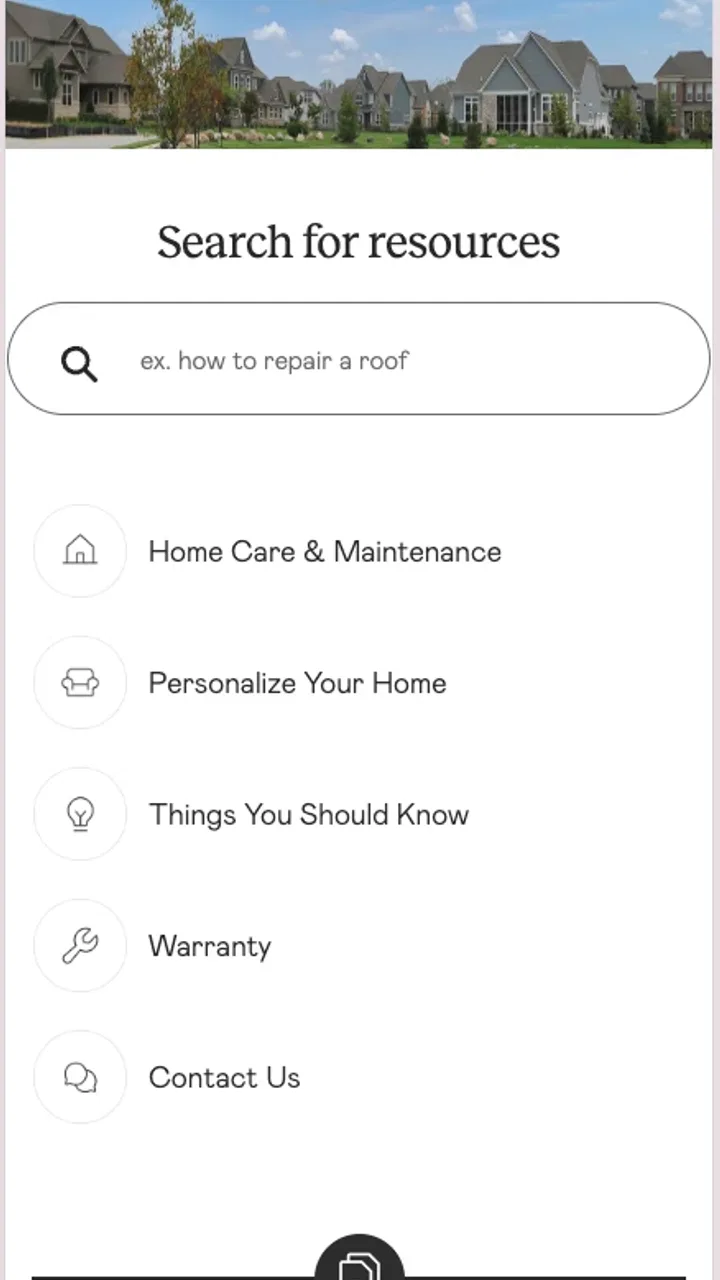
Owning a new home usually feels exciting until something needs attention. A loose fitting, a finish that needs correction, or a question about a covered item can quickly turn into a search through emails, paperwork, and phone contacts. Lennar Account is designed for that particular part of homeownership: it gives Lennar homeowners a place to submit and track claims instead of handling every request through scattered channels. I found its purpose refreshingly narrow, and that focus is also the key to deciding whether it belongs on your phone.
This is a free House & Home app from Lennar Corporation for Everyone, and it is available on devices running Android 10 or later. It was released on May 22, 2024, and the current version is 256.020.1. The app has reached over ten thousand installs, with a 4.2 average from around one hundred fifty ratings and twenty reviews. Those figures suggest a useful but still relatively focused service rather than a broad home-management platform.
How Lennar Account fits into a real homeowner’s routine
The basic workflow is straightforward: open the app, identify the issue, submit a claim, and return later to follow its progress. That sounds simple, but the practical benefit is that it gives a claim a defined home. Instead of wondering whether a message went to the right person or trying to remember which conversation contained an update, I can use the account area as the place to revisit the request.
You May Also Like

 AccuWeather: Weather Radar
AccuWeather Review: A Quick, Clear Forecast for Everyday Decisions
For everyday plans, the best forecast is the one you can understand quickly. AccuWeather makes rain timing, radar, and local conditions easy to act on, with a few trade-offs.

 Hill Climb Racing
Why Hill Climb Racing Still Turns Crashes Into One More Run
A tiny car, a bumpy hill and one more upgrade: Hill Climb Racing keeps resurfacing because its simple chaos makes every near-miss feel personal.

 AliExpress - Shopping App
AliExpress Makes Global Shopping Feel Personal, but Shoppers Bear the Risk
AliExpress turns a global marketplace into a pocket-sized discovery engine. Its reach is useful, its shopping loop compelling, and its trade-offs easy to miss.

 Lords Mobile: Kingdom Wars
Lords Mobile Is a Kingdom-Building Routine, Not a Quick Match
A case-by-case verdict on the building, battles, device demands, and social commitments that make Lords Mobile rewarding for some players and exhausting for others.

 PDF Scanner app - TapScanner
TapScanner Makes Paperwork Easier to Capture, Check, and Share
TapScanner makes scanning with a phone feel less like a rescue operation and more like a dependable step in getting work done. Its capture tools are useful, though not flawless.

 Block Blast!
 Shows How Much a Puzzle Game Can Leave Out
A quiet grid game shows why puzzle players increasingly value instant clarity, repeatable skill and low-pressure play—and where the genre still needs to catch up.
More From Our News Desk
View All News


For a homeowner, the most important habit is to treat each claim as a small record rather than a quick complaint. Before submitting, I would gather the room or area involved, a plain description of what happened, and any useful supporting information. If the app presents fields or prompts during submission, answering them carefully is likely to reduce back-and-forth later. The goal is not to write a long explanation; it is to make the first description clear enough that someone reviewing it understands the issue without guessing.
A realistic example would be noticing that a cabinet door no longer closes correctly after moving into a Lennar home. I would open the app while the problem is visible, describe the cabinet location in ordinary language, and submit the request while the details are fresh. Later, rather than searching my inbox or calling around to ask whether the request was received, I would return to the claim-tracking area. That change from memory-based follow-up to a repeatable routine is where the app earns its place.
The strongest reason to use Lennar Account is continuity: the submission and the follow-up live in the same homeowner-oriented service instead of being split between notes, email threads, and paper documents. It does not make a repair happen instantly, but it can make the homeowner’s side of the process more organized.
What I would prepare before submitting a claim
I recommend taking a moment to separate an actual issue from a general question. A claim should describe something that needs attention, while a question about maintenance or home operation may belong elsewhere. Keeping those situations distinct makes the claim list easier to understand and prevents a general request from becoming mixed with a specific repair record.
Photos can also be useful when the problem is visual, but I would not assume that adding more images automatically improves a request. A clear image showing the full context, followed by a closer view when necessary, is more useful than a collection of nearly identical shots. If the problem changes over time, noting when it appears and what seems to trigger it can be more informative than simply writing “not working.” The app’s value depends partly on the quality of the information I give it.
Another practical step is to submit separate issues separately when they involve different rooms, materials, or types of work. Combining unrelated problems into one description may feel faster, but it can make tracking less precise. A separate claim for a plumbing concern and another for a finish issue gives each matter a clearer identity and makes later follow-up easier to interpret.
Checking the account and submission experience
Because this is an account-based service for Lennar homeowners, I would begin by making sure I am using the account connected with the home I need to manage. This matters especially for people who have moved, own more than one Lennar property, or are helping a household member. Choosing the wrong account context can create confusion before the claim is even written.
I would also read every confirmation screen before leaving the submission flow. A quick tap through a form is tempting when the issue seems minor, but the final review is the best opportunity to catch an incorrect room description or an incomplete explanation. If the app shows a claim reference or status after submission, I would keep that information available in the app and avoid creating a second request just because I have not seen an immediate change.
That last point is an important trade-off. A tracking tool is most useful when I allow it to remain the source of truth. Repeatedly submitting the same issue through different routes can create duplicate work and make the history harder to follow. My preferred routine would be to submit once, check the recorded status, and use the existing claim when I need to follow up.
Settings and phone habits worth checking
Lennar Account is not the kind of app where I would expect a long list of personalisation controls. Its usefulness comes more from account accuracy and consistent checking than from elaborate settings. I would still review the account details available inside the app and make sure the contact information associated with the homeowner account is current. A service request is only as practical as the account attached to it.
I would also check how the app presents updates on my particular phone. Notification behaviour can vary with device settings, battery controls, and operating-system permissions. I would not rely on a notification alone for an important repair; I would open the app and review the claim itself when the matter is time-sensitive. This is a good example of combining settings with a habit: enable the alerts that are useful, but use the in-app status as the definitive place to check progress.
On a shared household phone, I would be careful about account access and screen privacy. A homeowner may want another family member to know that a claim exists, but that does not mean every account detail should be casually visible. The app’s account nature makes basic phone security worthwhile, particularly when the device is used by several people.
There is also a simple maintenance habit that experienced users should follow: keep the app updated through the normal app-store process when a newer version is offered. The current version is 256.020.1, and using an older build can create avoidable friction if the service changes. I would update before troubleshooting a strange display or submission problem, then reopen the app and confirm that the account and existing claims still appear as expected.
Faster patterns for repeat claims
After using the app once, I would create a small personal checklist outside the claim form: location, visible symptom, when it started, what I already tried, and whether the issue is getting worse. This is not a feature I am attributing to the app; it is a workflow that makes the app more effective. Having the same information ready each time reduces rushed descriptions and helps me compare several claims without mixing up details.
For recurring homeowner tasks, I would review the claim list at a regular point in the week rather than opening the app randomly. A short weekly check is easier to remember than repeatedly wondering whether something changed. If a claim is still active, I can decide whether a follow-up is appropriate. If it has moved forward, I have a clear record of what needs my attention next.
Another useful pattern is to use the phone camera deliberately before opening the submission screen. If I photograph the whole area first and then capture the detail, I can write a more precise description while looking at the same evidence. This is especially helpful for issues that are difficult to describe, such as a mark, alignment problem, or visible change in a surface. The app handles the claim workflow, while the preparation happens before I begin.
I would avoid treating the app as a general household diary. It is better suited to Lennar-related claims than to tracking appliance manuals, utility bills, renovation ideas, or everyday cleaning. Keeping its role narrow makes the list more meaningful. For broader home organisation, a notes app, shared task list, or document folder may be a better companion.
Where the focused design helps, and where it stops
Compared with calling a general customer-service line, the app gives me a more direct digital route to submit and track a claim. Compared with email, it is easier to return to a dedicated claim history instead of searching by subject line. Compared with a notes app, it is connected to the Lennar homeowner context rather than being a private reminder that I must manually explain elsewhere.
Those comparisons also show its limits. A notes app can store maintenance schedules, contractor contacts, measurements, and renovation plans, while Lennar Account is not intended to replace those tools. Email may still be useful when I need to preserve a longer conversation or share information with someone outside the app’s workflow. A phone call may be preferable when the situation is urgent or when I need immediate clarification rather than a tracked submission.
I would not choose this app as my main home-management tool if I am not a Lennar homeowner. Its narrow audience is not a weakness for the people it serves, but it does mean that renters, owners of other builders’ homes, and people looking for a universal maintenance tracker should look elsewhere. Even Lennar homeowners who mainly need emergency assistance should use the appropriate urgent channel instead of assuming a claim submission is the fastest response.
Advanced limits that are important to understand
The app can organise the homeowner’s side of a claim, but it cannot remove the need for judgment. I still need to decide whether an issue is minor, urgent, cosmetic, or potentially dangerous. I also need to describe what I see accurately and keep my expectations realistic about what a status screen can tell me. Tracking progress is not the same as controlling the schedule or guaranteeing a particular outcome.
There is a subtle difference between “submitted” and “resolved” that I would keep in mind. A recorded claim confirms that I have entered the process, but I should not treat that as proof that the underlying problem has been fixed. I would inspect the result in person, especially for issues involving water, doors, windows, electrical components, or anything that could affect safety. The app is a record and communication point, not a substitute for checking the home.
I would also be cautious about editing my description after submission if doing so could make the original situation unclear. When a problem changes, the best practice is to preserve the original description and add a clear update through the available claim workflow, rather than rewriting history in my own notes. That gives me a better personal timeline and reduces the chance that an important detail is forgotten.
For households with several open issues, prioritisation becomes essential. I would deal first with anything that could cause further damage, then handle functional problems, and leave purely cosmetic matters for a calmer review. This ordering is not a special Lennar Account feature; it is a way to prevent a long claim list from becoming an unhelpful queue. The app tracks the requests, while I decide which problem deserves attention first.
Who should install it
I would recommend Lennar Account to a Lennar homeowner who wants a simple, central way to submit and follow claims. It is particularly useful during the early period of settling into a home, when several small questions or defects may appear and remembering every conversation becomes difficult. The free price also removes the usual barrier to trying it, provided the user belongs to the intended homeowner audience.
It is a good fit for someone who prefers a visible status record over phone calls and for households where more than one person needs to know what has been reported. It can also help an organised homeowner build a repeatable routine: prepare the details, submit one issue clearly, check the existing claim, and verify the result after work is completed.
I would skip it if I need a complete property-management system, a universal repair database, or a tool for homes unrelated to Lennar. I would also avoid depending on it as the only response path for urgent situations. Its strength is focused claim handling, not broad household administration or emergency support.
My final assessment after using it as intended
Lennar Account is a practical, specialised app rather than an ambitious all-in-one home platform. That is exactly why I can see it being useful. It gives Lennar homeowners a dedicated place to submit and track claims, and it encourages a cleaner workflow than relying on memory, scattered messages, or handwritten reminders.
The best results come from using it with disciplined habits: check the account context, prepare a concise description, separate unrelated issues, review the submission carefully, and return to the existing claim instead of duplicating it. Those habits expose the app’s real value while also making its boundaries clear. It helps me manage the record of a request, but it does not replace sound judgement, direct communication when necessary, or a wider home-maintenance system.
With a 4.2 average and more than ten thousand installs, it has enough early adoption to show that the focused idea is useful to a real group of homeowners. I would recommend Lennar Account to Lennar owners who want a straightforward claim workflow and are comfortable checking the app as part of their routine. I would not recommend it as a general home app, but within its intended job, I found the narrow approach sensible and easier to maintain than a collection of disconnected alternatives.
FAQs for Lennar Account
01What is Lennar Account and what can I do with it?
Lennar Account is a digital platform designed to enhance the home-buying experience by providing tools and resources for managing your home purchase. With Lennar Account, users can track the progress of their home construction, access important documents, schedule appointments with contractors, and stay updated on community news and events.
02Is Lennar Account available for both Android and iOS devices?
Yes, Lennar Account is available on both Android and iOS platforms. It can be downloaded from the Google Play Store for Android devices and the Apple App Store for iOS devices, ensuring accessibility for a wide range of users who are interested in managing their home purchase on the go.
03How secure is my information on Lennar Account?
Lennar Account prioritizes user privacy and data security. The app employs robust encryption methods and security protocols to protect your personal and financial information. Users can feel confident that their data is safe, though it is always advisable to use strong passwords and secure devices to enhance security.
04Are there any costs associated with using Lennar Account?
Lennar Account is free to download and use. However, it is specifically designed for Lennar homebuyers and homeowners, so its features are tailored to those who have purchased or are in the process of purchasing a home through Lennar. There are no hidden fees for accessing the app’s features.
05Can I access Lennar Account on multiple devices?
Yes, Lennar Account allows users to access their account on multiple devices, ensuring flexibility and convenience. Whether you are at home or on the move, you can log in from different devices to stay updated on your home purchase process and manage your account efficiently.
Pros
- User-friendly interface for easy navigation.
- Secure login with multi-factor authentication.
- Quick access to account details and billing.
- Real-time updates on service requests.
- 24/7 customer support through the app.
Cons
- Limited customization options for dashboard.
- Occasional lag during peak usage times.
- No offline access to account information.
- Requires frequent app updates for stability.
- In-app notifications can be overwhelming.

Lennar Account
Gallery